15 October 2025

Add a Little Joy to your Buttons #JoelKallmanDay


Recently we were sitting outside at a café having a coffee and a slice of apple pie, something we do often. This is nothing remarkable, but when we ordered using our phone the last step had a little surprise when clicking the Pay-button.
Clicking on that button showed a shower of confetti on your screen. Even though the coffee and apple pie were overpriced, it still made me smile (maybe that's why they added it to the order page).
A quick google-action turned up this little Javascript-library (also has a demo of it): https://confettijs.org/
How easy is it to add this to your APEX application? Very easy!

The first step is to download the Javascript from the link above and upload it to your Static Application Files (Shared Components > Static Application Files > Create)
The next step is to include this Javascript in your page:
At Page Level look for "File URL" in the Javascript-section and add the following line

  #APP_FILES#confetti.min.js
  
Also at the Page Level, in the section "Execute when Page Loads" add the following code:
  let confetti = new Confetti('confetti'); // the argument is the static ID of the Button
  // Edit given parameters
  confetti.setCount(75);
  confetti.setSize(2);
  confetti.setPower(25);
  confetti.setFade(false);
  confetti.destroyTarget(false); // Will remove the button if true
  
The last step is to add a Static ID to the button where you want to add joy:


16 October 2024

Display JSON in APEX using APEX_MARKDOWN and JSON_TRANSFORM #JoelKallmanDay

Markdown is a plain text format for writing structured documents, and in APEX there is a built-in package that can transform Markdown notation into HTML.
With Markdown it is also possible to show pieces of code or JSON documents in a fixed size font. Having a fixed font to display JSON documents in APEX is easier to read than a non-fixed font.
The idea is to add Markdown to the JSON document and use the APEX_MARKDOWN package to convert the whole string in HTML.
Something like:

  ```json
  {"this":"that"}
  
The first line in the Markdown starts with three ticks (`) followed by "json", then the JSON document start on a new line.

To setup the example, use the following script to create a table and add some sample data. The sample data consist of three different JSON documents. Note that the first document includes a PDF file, the Base64 value representind the PDF has been shortened for brevity. In reality the Base54 value is enormous, but there is a solution for that in this post.

create table t 
(outgoing_message json) -- Oracle Database 23ai introduced the JSON datatype
/
insert into t (outgoing_message) 
values (
  '{
    "orderNumber" : "APX000328573",
    "invoiceNumber" : 2023300028,
    "salesChannel" : "Amazon",
    "file" :
    {
      "mime" : "application/pdf",
      "data" : "255044462D312E340A25C3A4C3BCC3B6C39F0A322030206F626A0A3C3C2F4C656E6774682033203020522F46696C7465722F466C6"
    }
  }'
);

insert into t (outgoing_message) 
values (
  '{
    "status" : "success",
    "message" : "The order update was successfully received."
  }
  '
);

insert into t (outgoing_message) 
values (
  '{
    "orderNumber" : "APX000328573",
    "timeStamp" : "2023-04-13T14:49:50.453269Z",
    "salesChannel" : "Amazon",
    "financialStatus" : "paid",
    "logisticStatus" : "ready for production",
    "payments" :
    [
      {
        "provider" : "Mollie",
        "date" : "2023-04-13T16:49:50",
        "amount" : 569.95,
        "currency" : "EUR"
      }
    ]
  }');
commit;

Displaying the complete Base64 string representing the PDF document does not add any value for the user looking at the JSON document and is most likey irrelevant.
Using the JSON_TRANSFORM function it is trivial to replace the comple Base64 string into something that is good enough for the user, in this example we will replace it with "<Base64Encoded PDF Document>".
Depending on the version of the database that you're using, the syntax has changed slightly from Oracle Database 19c to Oracle Database 23ai, use the following snippet:

-- Oracle Database 19c 
select json_transform (ann.outgoing_message
          ,set '$.file.data' = '<Base64Encoded PDF Document>'  ignore on missing
          returning clob 
         ) as outgoing_message
  from t ann


-- Oracle Database 23ai
select json_transform (ann.outgoing_message
          ,nested path '$' (
             set '@.file.data' = '<Base64Encoded PDF Document>' ignore on missing
            )
         ) as outgoing_message
  from t ann
;

The next step is to wrap the resulting JSON document with the Markdown tags and a new line break:

apex_markdown.to_html ('```json'||chr(10)||
This results in the following query and result:
   select json_transform (ann.outgoing_message
            ,nested path '$' (
               set '@.file.data' = '<Base64Encoded PDF Document>' ignore on missing
            )
         ) as outgoing_message
  from t ann;
  
  
<pre><code class="language-json">{
  "orderNumber" : "APX000328573",
  "invoiceNumber" : 2023300028,
  "salesChannel" : "Amazon",
  "file" :
  {
    "mime" : "application/pdf",
    "data" : "<Base64Encoded PDF Document>"
  }
}
</code></pre>

Links

23 February 2023

APEX Interactive Grid: Cell Selection as Default

When you want to copy a specific value from an Interactive Grid, you would need to change Row Selection to Cell Selection in the Actions menu.
When you don't want to expose the Actions-menu, or just to make it more convenient for your users, having Cell Selection as the Default might be more convenient.
To change this the Default, and set Cell Selection as the Default, add the following code to the Javascript Initialization Code section:

function(config) {
    config.defaultGridViewOptions = {
        selectCells: true
    }

    return config;
}

01 February 2023

Parse CSV-file in different Character Set with APEX_DATA_PARSER

When there are special characters in a CSV-file, and the file is in a different characterset than which you expect, parsing it can give unexpected results.
From different suppliers we get CSV-file, which need to be parsed and stored in the database. This is done by using APEX_DATA_PARSER.
APEX_DATA_PARSER is very flexible and allows several file-formats: JSON, XML, CSV and even native Excel XLSX.
The files are uploaded to the database (in the background) and processed. And this works like a charm,... until... one of the suppliers provided a CSV-file in a different character set, with special characters.

Below is an example of this file:

This file is uploaded to a database table with the following structure:

  Name         Null? Type          
------------ ----- ------------- 
MIME_TYPE          VARCHAR2(255) 
FILENAME           VARCHAR2(400) 
BLOB_CONTENT       BLOB  
  
The following query is used to parse the file and extract the data:
SQL> select p.col001
  2        ,p.col002
  3        ,p.col003
  4    from a
  5   cross
  6    apply apex_data_parser.parse (p_content => a.blob_content
  7                                 ,p_file_name => a.filename
  8                                 ) p
  9* /

COL001                     COL002     COL003     
__________________________ __________ __________ 
R�sselsheim am Main        3.000      624.760    
Gnutz                      1.000      139.490    
�ach-Palenberg             1.000      139.490    
Syke                       1.000      242.600    
H�kirchen-Siegertsbrunn    1.000      136.980    
Eberhardzell               1.000      233.810    
heinsberg                  1.000      67.840     
Hohndorf                   3.000      304.800    
Nidderau                   3.000      385.890    
N�n-Hardenberg             1.000      239.680    
Kl��1.000                  185.000               
K                          2.000      237.880    
W�rselen                   1.000      196.500    
Gl�ckstadt                 1.000      136.980    
Dessau-Ro�au               1.000      5.900      

15 rows selected. 
As you can see in the results above, the special characters have been removed. When a word in the first column ends in a special character, the parsing of the rest of the line is also messed up, there is a NULL in Column 3 while there should be a value.
Of course this has everything to do with the characterset of the uploaded file.

With the following command in a Terminal-window on Mac, it is possible to get information about the file, including the characterset:

  file -I name of the file
  
In my case that would yield the following results:
file -I charset.csv
charset.csv: text/plain; charset=iso-8859-1
  
This means that the file is in the characterset: ISO-8859-1

To find out which characterset this maps to in the database, the following query can help:

  SQL> select value
  2    from v$nls_valid_values
  3   where parameter  ='CHARACTERSET'
  4     and value like '%8859%'
  5* /

VALUE             
_________________ 
WE8ISO8859P1      
EE8ISO8859P2      
SE8ISO8859P3      
NEE8ISO8859P4     
CL8ISO8859P5      
AR8ISO8859P6      
EL8ISO8859P7      
IW8ISO8859P8      
WE8ISO8859P9      
NE8ISO8859P10     
WE8ISO8859P15     
BLT8ISO8859P13    
CEL8ISO8859P14    
AZ8ISO8859P9E     

14 rows selected.
  
From this list WE8ISO8859P1 is selected and passed in into the APEX_DATA_PARSER function:

SQL> select p.col001
  2        ,p.col002
  3        ,p.col003
  4    from all_csvs a
  5   cross
  6    apply apex_data_parser.parse (p_content => a.blob_content
  7                                 ,p_file_name => a.filename
  8                                 ,p_file_charset => 'WE8ISO8859P1'
  9                                 ) p
 10* /

COL001                        COL002    COL003     
_____________________________ _________ __________ 
Rüsselsheim am Main           3.000     624.760    
Gnutz                         1.000     139.490    
Übach-Palenberg               1.000     139.490    
Syke                          1.000     242.600    
Höhenkirchen-Siegertsbrunn    1.000     136.980    
Eberhardzell                  1.000     233.810    
heinsberg                     1.000     67.840     
Hohndorf                      3.000     304.800    
Nidderau                      3.000     385.890    
Nörten-Hardenberg             1.000     239.680    
Klüß                          1.000     185.000    
Köln                          2.000     237.880    
Würselen                      1.000     196.500    
Glückstadt                    1.000     136.980    
Dessau-Roßlau                 1.000     5.900      

15 rows selected.

And now all is well.

21 December 2022

APEX Calendar showing incorrect Week Number

The users of our application wanted to have the week number shown as well in the Calendar.
This can be easily done with a little bit of JavaScript. In the "Advanced" section of the Region Attributes, the is room to add "JavaScript Initialization Code".
The "Help" for this region even shows how to add week numbers in the Calendar:

Copy-and-Paste the JavaScript from the Help to the JavaScript Initialization Code and you're done:
function ( pOptions) {
    pOptions.weekNumbers      = true;
    pOptions.weekNumberTitle  = "CW ";
    return pOptions;
}
However, in our case, it didn't show the correct week number. Week number 41 and December 12 don't line up:

Add the following code to the JavaScript Initialization Code in the Advanced section of the Attributes for your Calendar region, and the week number is shown correctly:

function ( pOptions) {
    pOptions.weekNumbers      = true;
    pOptions.weekNumberTitle  = "CW ";
    pOptions.weekNumberCalculation = "ISO";
    return pOptions;
}

11 October 2022

Intervals go ISO-8601 #JoelKallmanDay

Another year, and it's time to write an entry for the #JoelKallmanDay.

My recent discovery in Oracle Database 21c, the innovation release, is how intervals can also be in ISO-8601 format.
The ISO-8601 format is an international standard for describing Date and Time formats in data exchanges.
There are two flavors of interval in the Oracle Database, "Day to Second" and "Year to Month" and there are specialized functions to convert strings in a certain format to an interval. The following example creates a "Day to Second" interval of 4 days, 3 hours, 25 minutes and 42 seconds:

SQL> select to_dsinterval ('4 3:25:42')
  2    from dual
  3* /

TO_DSINTERVAL('43:2
-------------------
+04 03:25:42.000000
Feeding this "Day to Second" interval into a JSON_SCALAR function will return the ISO-8601 standard for this interval:
SQL> select json_scalar (to_dsinterval ('4 3:25:42'))
  2    from dual
  3* /

JSON_SCALAR(TO_DSINTERVAL('43:25:42'))                                   
-------------------------------------------------------------------------
"P4DT3H25M42S" 
The reverse is also true, it is possible to feed an ISO-8601 interval into the TO_DSINTERVAL function and get an Oracle interval returned:
SQL> select to_dsinterval ('P7DT4H12M53S')
  2    from dual
  3* /

TO_DSINTERVAL('P7DT
-------------------
+07 04:12:53.000000
This works the same for "Year to Day" intervals.

04 April 2022

Interactive Grid: Filter on Column that shows an Icon

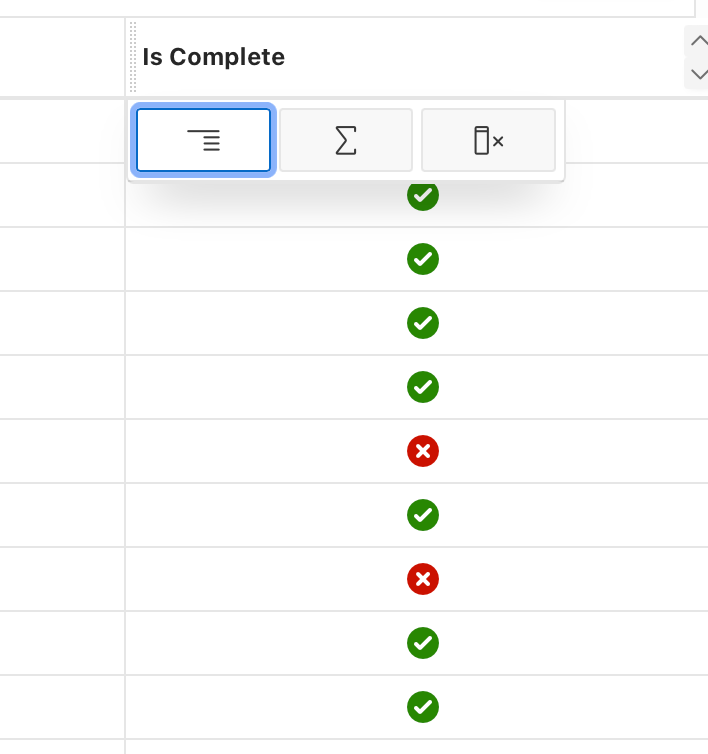
For one of our Interactive Grid we wanted to show the status of a column as an icon and still be able to filter on that column. Out of the box this is not possible. When choosing "HTML Expression" it is possible to show an icon in the column values but filtering is no longer possible.
When choosing "Text" as the column it is possible to filter on the column, but you can't specify an HTML Expression to format the column values.
Let's examine this in a little more detail and also show a solution, provided by Andreas Wismann

Let's start with the query that I will use:

select p.id as pid
      ,p.assignee
      ,p.name
      ,p.description
      ,p.start_date
      ,p.end_date
      ,case p.is_complete_yn
       when 'Y' then 'Yes'
       when 'N' then 'No'
       end as is_complete
      ,case p.is_complete_yn
       when 'Y' then 'fa-check-circle u-success-text'
       when 'N' then 'fa-times-circle u-danger-text'
       end as is_complete_icon
  from eba_demo_proj_tasks p
The last two columns (is_complete and is_complete_icon) are the ones that matter in this example. IS_COMPLETE will provide a proper English word instead of a single letter representing the status. IS_COMPLETE_ICON will translate the single letter to the appropriate icon to be shown in the column values. This column (IS_COMPLETE_ICON) will be hidden because we will use it only to format the column values.

First the plain vanilla version, no icon yet. The screenshots below show the text of the status, as well as the filter that it will produce.

Next we will change the column from "Text" to "HTML Expression", this allows to change the column value to whatever HTML you can come up with. As I want to shown an icon, this is the HTML that I used:

 <span aria-hidden="true" class="fa &IS_COMPLETE_ICON."></span>
This will result in a properly formatted column, the coveted icon that we were looking for, but it is no longer possible to filter on that column. Below are screenshots of the effect that it has.

After struggling with this problem for a while, I reached out on the Twitter APEX Community and I was very happy that Andreas Wismann replied because his solution works like a charm.

As the code doesn't show properly in the screenshot from Twitter, and also for easy Copy-Paste, this is the code that you put in the JavaScript Initialization Code of the column where you want to show the icon
function( config ) {
    config.defaultGridColumnOptions = {
        cellTemplate: '<span aria-hidden="true" class="fa &IS_COMPLETE_ICON."></span>'
    };
    return config;
}
And the final result in pictures:

17 March 2022

ORA-24017: cannot enable enqueue on QUEUE, %s is an exception queue

Generating documents can take quite some time, which I prefer to do in the background. To facilitate this we use Advanced Queueing (DBMS_AQ). We place the orders that we want to have a document for in a Queue. There is a callback function on the Queue which will take care of the document generation (we use APEX Office Print).
If the above is abacadabra to you, I suggest you read up on DBMS_AQ and callback functions on this blog by Adrian Billington.

Normally this works flawlessly, until recently when there was a typo in the URL to call AOP.
When the callback function would try to call AOP, it was unable to do so. Eventually this would cause that the message in the Queue would be moved to the Exception Queue.

So now we have all these messages in the Exception Queue and still no documents. The plan was to Dequeue the messages from the Exception Queue to the Normal Queue and have them processed again, of course after the typo was corrected.
By default it is not possible to Dequeue messages from the Exception Queue. So step one would be to enable Dequeue for the Exception Queue.

First step: find out the name of the Exception Queue:

  SQL> select name
  2        ,queue_table
  3        ,queue_type
  4    from user_queues
  5* /

                       NAME              QUEUE_TABLE         QUEUE_TYPE 
___________________________ ________________________ __________________ 
AQ$_ORDER_DOCUMENTS_QUEUE_E    ORDER_DOCUMENTS_QUEUE    EXCEPTION_QUEUE    
DOCUMENTS_QUEUE                ORDER_DOCUMENTS_QUEUE    NORMAL_QUEUE       
  

Next step, enable the Dequeue on the Exception Queue:

SQL> begin
  2     dbms_aqadm.start_queue (queue_name => 'AQ$_ORDER_DOCUMENTS_QUEUE_E'
  3                            ,dequeue    => true
  4                            );
  5  end;
  6* /

Error starting at line : 1 in command -
begin
   dbms_aqadm.start_queue (queue_name => 'AQ$_ORDER_DOCUMENTS_QUEUE_E'
                          ,dequeue    => true
                          );
end;
Error report -
ORA-24017: cannot enable enqueue on QUEUE, AQ$_ORDER_DOCUMENTS_QUEUE_E is an exception queue
ORA-06512: at "SYS.DBMS_AQADM", line 747
ORA-06512: at "SYS.DBMS_AQADM_SYS", line 8626
ORA-06512: at "SYS.DBMS_AQADM_SYSCALLS", line 124
ORA-06512: at "SYS.DBMS_AQADM_SYS", line 8540
ORA-06512: at "SYS.DBMS_AQADM", line 742
ORA-06512: at line 2
24017. 00000 -  "cannot enable enqueue on QUEUE, %s is an exception queue"
*Cause:    User tried to enable enqueueing to an exception queue.
*Action:   None.

However this doesn't work, as you can see above.
As I didn't read the error message properly, I thought it said that Dequeue was not allowed on an Exception Queue, but it was complaining about the Enqueue.
The default value for the Enqueue argument in DBMS_ADADM.START_QUEUE is true, and this is not allowed.

SQL> begin
  2     dbms_aqadm.start_queue (queue_name => 'AQ$_ORDER_DOCUMENTS_QUEUE_E'
  3                            ,enqueue    => false
  4                            ,dequeue    => true
  5                            );
  6  end;
  7* /

PL/SQL procedure successfully completed.

Including the Enqueue argument in the call to DBMS_AQADM.START_QUEUE remedies this.

Now it is trivial to Dequeue from the Exception Queue and Enqueue on the Normal Queue:

declare
   l_dequeue_options    dbms_aq.dequeue_options_t;
   l_message_properties dbms_aq.message_properties_t;
   l_message_handle     raw(16);
   l_payload            document_queue_ot;
   
   l_enqueue_options    dbms_aq.enqueue_options_t;
begin
   for r in (select q.msgid
               from order_documents_queue q
              where q_name = 'AQ$_ORDER_DOCUMENTS_QUEUE_E')
   loop
      l_dequeue_options.msgid := r.msgid;
      dbms_aq.dequeue (queue_name         => 'AQ$_ORDER_DOCUMENTS_QUEUE_E'
                      ,dequeue_options    => l_dequeue_options
                      ,message_properties => l_message_properties
                      ,payload            => l_payload
                      ,msgid              => l_message_handle
                      );
      dbms_aq.enqueue (queue_name         => 'documents_queue'
                      ,enqueue_options    => l_enqueue_options
                      ,message_properties => l_message_properties
                      ,payload            => l_payload
                      ,msgid              => l_message_handle
                      );
   end loop;
end;

After the processing of the Normal Queue, there were still a few messages that popped back into the Exception Queue. After careful examination, it was determined that they could be purged from the Exception Queue:

declare
   po_t dbms_aqadm.aq$_purge_options_t;
begin
   dbms_aqadm.purge_queue_table ('ORDER_DOCUMENTS_QUEUE'
                                ,'qtview.queue = ''AQ$_ORDER_DOCUMENTS_QUEUE_E'''
                                , po_t
                                );
end;
/

Links

02 March 2022

Modify a JSON structure with a single Update

Recently there was a question on the Oracle Community Forum related to JSON, more specifically how to change the structure of it. The link to the Question is at the bottom of this post.
The starting point is the following JSON:

  {
   "tktKey": "123456",
   "attlist1": [
      {
         "attkey": "123",
         "attval": "abc"
      },
      {
         "attkey": "456",
         "attval": "def"
      }
   ],
   "attlist2": [
      {
         "attkey": "098",
         "attval": "xyz"
      }
   ]
}
  
The task at hand was to combine both attlist1 and attlist2 into a single attlist.
To do this the JSON object that is contained in attlist2 need to be extracted and place in attlist1. After that the element attlist2 can be removed from the structure. When this is done, there is an element with attlist1 with three JSON objects in it. Finally the element attlist1 needs to be renamed to attlist.
All of these actions can be done with a single SQL statement using JSON_TRANSFORM.

Let's first create a table to hold the original JSON
   SQL> create table js
  2  (str clob 
  3  )
  4* /

Table JS created.
   
And insert the JSON Object in there.
   SQL> insert into js values ('{ "tktKey": "123456", "attlist1": [ { "attkey": "123",   "attval": "abc"  },  { "attkey": "456","attval": "def"  } ],  "attlist2": [{"attkey": "098", "attval": "xyz"  } ]}')
  2* /

1 row inserted.
   
Here comes the magic moment:
   SQL> update js
  2     set str= json_transform
  3                (js.str
  4                ,append '$.attlist1'
  5                    = json_query (js.str, '$.attlist2[*]')
  6                ,remove '$.attlist2'
  7                ,rename '$.attlist1' ='attlist')
  8* /

1 row updated.
   
With JSON_QUERY (line 5) I extract the JSON Object from attlist2, which is added (APPEND, line 4) to attlist1.
Attlist2 is removed from the JSON object (line 6) and finally on line 7 attlist1 is renamed to attlist.

And to view the results, in a nice readable format:
SQL> select json_query (j.str, '$' returning clob pretty) as result
  2    from js j
  3* /

RESULT 
_______ 
{
  "tktKey" : "123456",
  "attlist" :
  [
    {
      "attkey" : "123",
      "attval" : "abc"
    },
    {
      "attkey" : "456",
      "attval" : "def"
    },
    {
      "attkey" : "098",
      "attval" : "xyz"
    }
  ]
}    

The more I use the JSON functionality that the Oracle database has to offer, the more I like them!


Links

12 October 2021

Everybody needs a break: APEX_WEB_SERVICE #JoelKallmanDay

When Tim Hall announced that there will be a Community blog-day in memory of Joel Kallman, I knew I wanted to participate.
For this post, I'll keep it technical (somewhat).

I'm old enough to remember what a hassle it was to call a webservice from PL/SQL and now appreciate how easy it is. So, this post is about APEX_WEB_SERVICE.
To show how easy it is to work with APEX_WEB_SERVICE and as everybody loves a holiday, I decided to combine the two.
There is a webservice which gives you public holidays (per country) which can be found at: https://date.nager.at/.

For this example I created a table which holds the date and the description of the holiday

  create table my_holidays
   (holiday date
   ,description varchar2(500)
   )
  

And the procedure to populate the table for a given year is as follows:

create or replace
procedure populate_holidays (p_year in number)
is
   --
   l_url      constant varchar2(500) := 'https://date.nager.at/api/v3/publicholidays';
   l_response blob;
   --
begin
   l_response := apex_web_service.make_rest_request_b (p_url         => l_url||'/'||to_char (p_year)||'/NL'
                                                      ,p_http_method => 'GET'
                                                      );
   insert into my_holidays
      (holiday
      ,description
      )
   select dt
         ,name
     from json_table (l_response, '$[*]'
               columns (dt date path '$.date'
                       ,name varchar2(100) path '$.name'
                       ,nested path '$.counties[*]'
                            columns (county path '$')))
   ;
end populate_holidays;

Look at the elegance of the call to APEX_WEB_SERVICE, a very straightforward call to the URL of the Public Holiday API.
An INSERT-SELECT with a JSON_TABLE completes the procedure.

Calling the procedure with

begin
   populate_holidays (p_year => 2022);
end;
/
  
yields the following result:
select *
  from my_holidays
/
01-01-22	New Year's Day
15-04-22	Good Friday
17-04-22	Easter Sunday
18-04-22	Easter Monday
27-04-22	King's Day
05-05-22	Liberation Day
26-05-22	Ascension Day
05-06-22	Pentecost
06-06-22	Whit Monday
25-12-22	Christmas Day
26-12-22	St. Stephen's Day
Never knew that the second day of Christmas (yes, we have that in The Netherlands) is called St. Stephen's Day.

14 July 2021

SQLCL 21.2: APEX LIST Command gives error (and a work around)

Recently I've upgraded to the latest SQLCl release, currently 21.2, and found a small bug.
To quickly export APEX applications I often use the "APEX"-commands in SQLCl. Exporting an APEX application is done by issuing the following command:

  apex export 1000
  
where you pass in the number of the application that you want to export.
This still works fine, but I don't always remember the application id, so I use "APEX list" to show a list of APEX-applications. This command is failing in this release unfortunatelly.
To demonstrate that this is happening:
SQL> show version
Oracle SQLDeveloper Command-Line (SQLcl) version: 21.2.0.0 build: 21.2.0.169.1529
  
The "APEX" and "APEX list" commands interchangable.
SQL> apex
2021-07-14 08:55:35.327 SEVERE oracle.dbtools.raptor.newscriptrunner.ScriptExecutor run java.base/java.util.Collections.nCopies(Collections.java:5027)
java.lang.IllegalArgumentException: List length = -3
        at java.base/java.util.Collections.nCopies(Collections.java:5027)
        at oracle.dbtools.raptor.utils.AnsiColorListPrinter.printHeaders(AnsiColorListPrinter.java:90)
        at oracle.dbtools.raptor.utils.ListPrinter.print(ListPrinter.java:96)
        at oracle.dbtools.raptor.utils.ListPrinter.print(ListPrinter.java:68)
        at oracle.dbtools.raptor.utils.ListPrinter.print(ListPrinter.java:62)
        at oracle.dbtools.raptor.utils.ListPrinter.printListofList(ListPrinter.java:208)
        at oracle.dbtools.raptor.newscriptrunner.commands.ApexCmd.printList(ApexCmd.java:250)
        at oracle.dbtools.raptor.newscriptrunner.commands.ApexCmd.handleEvent(ApexCmd.java:173)
        at oracle.dbtools.raptor.newscriptrunner.CommandRegistry.fireListeners(CommandRegistry.java:346)
        at oracle.dbtools.raptor.newscriptrunner.ScriptRunner.run(ScriptRunner.java:226)
        at oracle.dbtools.raptor.newscriptrunner.ScriptExecutor.run(ScriptExecutor.java:344)
        at oracle.dbtools.raptor.newscriptrunner.ScriptExecutor.run(ScriptExecutor.java:227)
        at oracle.dbtools.raptor.scriptrunner.cmdline.SqlCli.processLine(SqlCli.java:341)
        at oracle.dbtools.raptor.scriptrunner.cmdline.SqlCli.runSqlcl(SqlCli.java:1049)
        at oracle.dbtools.raptor.scriptrunner.cmdline.SqlCli.main(SqlCli.java:369)
  
As you can see using the "APEX" command in SQLCl raises some kind of Java-exception.
And if you run into an exception, what do you do? Of course you run to tweet about it... knowing that Jeff Smith, Product Manager at Oracle is always listening (or at least it seems that way). He replied with a solution to my problem
And using the ALTER SESSION command to set the NLS_DATE_FORMAT, things work again.
SQL> alter session set nls_date_format = 'DD-MON-RR HH:MI:SSpm'
  2* /

Session altered.
SQL> apex
       WORKSPACE_ID    WORKSPACE    APPLICATION_ID                           APPLICATION_NAME       BUILD_STATUS         LAST_UPDATED_ON 
___________________ ____________ _________________ __________________________________________ __________________ _______________________ 
1500550789501687    ALEX      1000              Master Application                         Run and Develop    18-JUN-21 11:42:49am    
And no, it doesn't have to be that particular format mask for NLS_DATE_FORMAT. You can also a different format mask, like 'dd-mm-yyyy hh24:mi'. It changes how the last column is formatted in your output.

Thanks to Turloch O'Tierney to come up with this soluttion.

12 November 2020

Automatically Not Null when adding a DEFAULT Clause

Today I learned something new about the DEFAULT ON NULL clause.
Since Oracle database release 12 it is possible to define a DEFAULT ON NULL clause which is used when a NULL is provided as value. The thing I didn't know is that the column is automatically defined as NOT NULL.
Is this documented behaviour? Yes, it is. Quote from the documentation:

When you specify ON NULL, the NOT NULL constraint and NOT DEFERRABLE constraint state are implicitly specified.

SQL> select banner
  2    from v$version
  3  /

BANNER
--------------------------------------------------------------------------------
Oracle Database 19c Enterprise Edition Release 19.0.0.0.0 - Production
SQL> create table t 
  2  (col1 varchar2(10) default on null 'hello')
  3  /

Table T created.

SQL> desc t
Name Null?    Type         
---- -------- ------------ 
COL1 NOT NULL VARCHAR2(10) 

And in case you are wondering if you can change the column afterwards to NULL, the answer is "no".

SQL> alter table t 
  2  modify (col1 null)
  3  /

Error starting at line : 1 in command -
alter table t 
modify (col1 null)
Error report -
ORA-01451: column to be modified to NULL cannot be modified to NULL
01451. 00000 -  "column to be modified to NULL cannot be modified to NULL"
*Cause:    the column may already allow NULL values, the NOT NULL constraint
           is part of a primary key or check constraint.
*Action:   if a primary key or check constraint is enforcing the NOT NULL
           constraint, then drop that constraint.

22 October 2020

Qualified Expressions Quite Puzzling - Part Three: Bug!

After some back and forth with Patrick Barel and Steven Feuerstein, it became clear that it most likely is a bug with Qualified Expressions.
A simple case to reproduce the bug is below

SQL> set serveroutput on


SQL> declare
  2     type tbl_t is table of pls_integer
  3        index by pls_integer;
  4     l_tbl tbl_t;
  5     l_idx pls_integer;
  6  begin
  7     for i in 1..3
  8     loop
  9        l_tbl := tbl_t (i => i);
 10     end loop;
 11     --
 12     l_idx := l_tbl.first;
 13     while l_idx is not null
 14     loop
 15        sys.dbms_output.put_line (to_char (l_idx)
 16                                 ||' - '||
 17                                 to_char (l_tbl(l_idx))
 18                                 );
 19        l_idx := l_tbl.next (l_idx);
 20     end loop;
 21  end;
 22  /


1 - 1
2 - 2
3 - 3


PL/SQL procedure successfully completed.
Why it is the above a bug? If you do the a similar assignment, but without a loop, the outcome is different (and most likely correct)
SQL> declare
  2     type tbl_t is table of pls_integer
  3        index by pls_integer;
  4     l_tbl tbl_t;
  5     l_idx pls_integer;
  6  begin
  7     l_tbl := tbl_t (1 => 1);
  8     l_tbl := tbl_t (2 => 2);
  9     l_tbl := tbl_t (3 => 3);
 10     --
 11     l_idx := l_tbl.first;
 12     while l_idx is not null
 13     loop
 14        sys.dbms_output.put_line (to_char (l_idx)
 15                                 ||' - '||
 16                                 to_char (l_tbl(l_idx))
 17                                 );
 18        l_idx := l_tbl.next (l_idx);
 19     end loop;
 20  end;
 21  /


3 - 3


PL/SQL procedure successfully completed.

Bug 32057533 - ASSIGNMENT TO COLLECTION USING QUALIFIED EXPRESSION APPENDS INSTEAD OF REPLACING.

21 October 2020

Qualified Expressions Quite Puzzling - Part Two

After I published my blog about Qualified Expressions, my dear friend Patrick Barel made a comment that my remarks about the Cursor For Loop was not at all what he expected to happen.

This is the code block that Patrick referred to.

 10     for r in (select * from t)
 11     loop
 12           l_tbl := tbl_t (l_tbl.count + 1 => rec_t (num1 => r.id
 13                                                    ,num2 => r.id));
 14     end loop;
  
with these results
1 - 1
2 - 2
3 - 3
   
A different way of looking at this code example might expect the outcome to be only one record, being the last one.
Each iteration would replace the complete Associative Array with a new instance of it.

So, there was another Puzzling thing in the original blogpost that I hadn't noticed before, probably because I wasn't looking for it. Why isn't the whole Associative Array replaced? It seems that this code would append values in the Associative Array and this was my objective. Strange indeed.
Anyhoo, probably the better way of working with Qualified Expressions to append values to the Associative Array, the index should be on the other side of the assignment:
 10     for r in (select * from t)
 11     loop
 12        l_tbl (l_tbl.count + 1) := rec_t (num1 => r.id
 13                                         ,num2 => r.id);
 14     end loop;
   

When inserting the pointless conditions inside the For Loop, all values from the table are inserted into the Associative Array

 10     for r in (select * from t)
 11     loop
 12        if r.yes_no = 'Y'
 13        then
 14           l_tbl (l_tbl.count + 1) := rec_t (num1 => r.id
 15                                            ,num2 => r.id);
 16        else
 17           l_tbl (l_tbl.count + 1) := rec_t (num1 => r.id
 18                                            ,num2 => r.id);
 19        end if;
 20     end loop;
  
with all records from the table that get populated in the Associative Array:
1 - 1
2 - 2
3 - 3
   

20 October 2020

Qualified Expressions Quite Puzzling

Qualified expressions for PL/SQL were introduced in version 18 of the Oracle database. They provide a clearer way of working with collections. At the bottom of this post is the link to the official documentation.
However recently I encountered something that left me puzzled and I still can't explain the reason why. So this blogpost is just about my observations and I welcome any comments.

First a short demo of how you can work with Qualified Expressions.

  SQL> select banner
  2    from v$version;

BANNER 
___________________________________________________________________ 
Oracle Database 18c EE High Perf Release 18.0.0.0.0 - Production   
  
  SQL> set serveroutput on


SQL> declare
  2     type rec_t is record
  3         (num1 number
  4         ,num2 number);
  5     type tbl_t is table of rec_t
  6        index by pls_integer;
  7     l_tbl tbl_t;
  8     l_idx pls_integer;
  9  begin
 10     for i in 1..3
 11     loop
 12        l_tbl := tbl_t (i => rec_t (num1 => i
 13                                   ,num2 => i));
 14     end loop;
 15     --
 16     l_idx := l_tbl.first;
 17     while l_idx is not null
 18     loop
 19        sys.dbms_output.put_line (to_char (l_tbl(l_idx).num1)
 20                                 ||' - '||
 21                                 to_char (l_tbl(l_idx).num2)
 22                                 );
 23        l_idx := l_tbl.next (l_idx);
 24     end loop;
 25  end;
 26  /
   
On line 2 - 4 a Record Type is declared with two numeric attributes. Line 5 and 6 define an Associative Array of the Record Type.
The Qualified Expression is on lines 12 and 13.
In the loop we assign the loop index variable to the Record Type using the Qualified Expression syntax.
To view the content of the Associative Array, lines 16 through 24 are used. When running this block of code the output is:
1 - 1
2 - 2
3 - 3
   
No surprises here, it works as expected. Well, actually it is surprising take a look at the follow-up blog.

Cursor For Loop

The previous example used a Numeric For Loop, but I observed strange things when using a Cursor For Loop.

  SQL> drop table t purge
  2  /


Table T dropped.

SQL> create table t
  2  (id number
  3  ,yes_no varchar2(1)
  4  )
  5  /


Table T created.

SQL> insert into t values (1, 'Y');


1 row inserted.

SQL> insert into t values (2, 'N');


1 row inserted.

SQL> insert into t values (3, 'Y');


1 row inserted.

SQL> commit;


Commit complete.
  
The table contains three records with different Yes/No-indicators. Instead of showing the complete block of code I will only show the changes that I made using the previous example.
 10     for r in (select * from t)
 11     loop
 12           l_tbl := tbl_t (l_tbl.count + 1 => rec_t (num1 => r.id
 13                                                    ,num2 => r.id));
 14     end loop;
  
The Numeric For Loop is removed and a Cursor For Loop is inserted in the code block. Instead of using the index-variable from the first code example, I am using the current count of the Associative Array and add one to that (l_tbl.count + 1).
The results are the same as the first code block.
1 - 1
2 - 2
3 - 3
   

...but you said Strange Things?

Yes, I did... but so far, it seems normal.
The strange thing happens when a condition is added inside the For-Loop.

 10     for r in (select * from t)
 11     loop
 12        if r.yes_no = 'Y'
 13        then
 14           l_tbl := tbl_t (l_tbl.count + 1 => rec_t (num1 => r.id
 15                                                    ,num2 => r.id));
 16        else
 17           l_tbl := tbl_t (l_tbl.count + 1 => rec_t (num1 => r.id
 18                                                    ,num2 => r.id));
 19  
 20        end if;
 21     end loop;
  
The table has a Yes_No column and inside the For Loop, the value of this column is used.
When you examine the code above, you will notice that it will assign a value to the collection regardless of the value of the column. The assignment is exactly the same in lines 14-15 and 17-18. The content of the Associative Array after the loop should be the same as before, but this is not the case.
The result looks like this:
  1 - 1
  3 - 3
  
What happened to the second record?... Your guess is as good as mine.

I've tried several variations, like using a local counter to assign instead of the collection.count + 1, but that doesn't make a difference.
Like said before: I welcome your comments for more insight into this strange behavior.

The same is reproducable on Oracle 19...

  SQL> select banner 
  2    from v$version
  3  /

BANNER 
_________________________________________________________________________ 
Oracle Database 19c Enterprise Edition Release 19.0.0.0.0 - Production  
  

Links

05 June 2020

Conditional Compilation; One Dynamic Package Specification

When you want to make a distinction between different databases (like Development, Test, Acceptance, and Production) and have a single code base, conditional compilation can help out. Most of the time I read about conditional compilation when the use case is to eliminate code from the production environment, like instrumentation, which is of course a legit scenario. Some functionality should never run on Production, but likewise some functionality should never run on Dev, Test or Acceptance.

For example; we sent out emails to customers about their order statusses. This functionality should only be run on the Production database, and never-ever on any of the other databases. Initially there was a toggle in the application dictating if the emails should go to customers or to a dummy email address within the company. How fool-proof is this solution? Short answer: it's not. Sooner or later there will be someone who sets the toggle to "Sent to Customers" in the wrong environment. Of course there are many more examples like this one.

Anyway, to determine the environment which can be used for conditional compilation, I use a package specification which is compiled dynamically. Using the database name, which can be found in the USERENV context, the value is determined. To output a textual representation of a boolean value, I use LOGGER.TOCHAR to output "true", "false" or "null", but of course you can also write your own boolean-to-text-translation.

declare
   l_pack_spec varchar2(32767);
   l_env varchar2(25);
begin
   l_env := sys_context ('userenv', 'db_name');
   l_pack_spec := 'create or replace package environment_pkg'||chr(10);
   l_pack_spec := l_pack_spec ||'is'||chr(10);
   l_pack_spec := l_pack_spec ||'   --=='||chr(10);
   l_pack_spec := l_pack_spec ||'   -- Environment Information, useful for conditional compilation'||chr(10);
   l_pack_spec := l_pack_spec ||'   development constant boolean := '||lower (logger.tochar (l_env = 'DEV'))||';'||chr(10);
   l_pack_spec := l_pack_spec ||'   test        constant boolean := '||lower (logger.tochar (l_env = 'TST'))||';'||chr(10);
   l_pack_spec := l_pack_spec ||'   acceptance  constant boolean := '||lower (logger.tochar (l_env = 'ACC'))||';'||chr(10);
   l_pack_spec := l_pack_spec ||'   production  constant boolean := '||lower (logger.tochar (l_env = 'PRD'))||';'||chr(10);
   l_pack_spec := l_pack_spec ||'   --=='||chr(10);
   l_pack_spec := l_pack_spec ||'end environment_pkg;'||chr(10);
   execute immediate l_pack_spec;
end;

When you run the code above, the resulting code will be something like:

package environment_pkg
is
   --==
   -- Environment Information, useful for conditional compilation
   development constant boolean := true;
   test        constant boolean := false;
   acceptance  constant boolean := false;
   production  constant boolean := false;
   --==
end environment_pkg;

Indicating that the current database is the Development database.

Now you can use conditional compilation to include or exclude certain code sections, like:

$if environment_pkg.production $then
   -- Here comes the code to send an email to customers
   ....
$else
   -- Here comes the code to send an email to a dummy internal address
   ....
$end

To see the effect of conditional compilation, what does the code actually look like, you can use the built in package DBMS_PREPROCESSOR.PRINT_POST_PROCESSED_SOURCE which output the result to DBMS_OUTPUT

set serveroutput on
begin
   dbms_preprocessor.print_post_processed_source (object_type    => 'PACKAGE BODY'
                                                 ,schema_name    => user
                                                 ,object_name    => 'MAIL_PKG' -- package where you use the conditional compilation
                                                 );
end;
/

24 April 2020

First and Last Day of the ISO-year

The customer had the request for a report regarding the sales figures Year to Date, per week. More specifically: ISO-week.
More information about ISO-week, go to Wikipedia: ISO-week
Initially I didn't think too much about it, I know Oracle provides the format mask "IW" to get the ISO-week number, and thought that would do. But there is a little bit more to consider.
More information on format masks in Oracle Database 19c: Format Masks

Formatting the date to reflect the ISO-week is easy enough:

to_char (sysdate, 'iw')
which would give you output like '03' or '14'.
Just formatting the dates with this format mask could be sufficient... but there might be a snag to it.

The customer in my case wanted to see the data per year, so the first selection would be the year. Then a report would be shown with the number of order per ISO-week.
To get all the relevant data from the database I would add a filter like this one:
where order_date between to_date ('01-01-'||:P_YEAR, 'dd-mm-yyyy')
                     and to_date ('31-12-'||:P_YEAR, 'dd-mm-yyyy')
to select all the data for a given calendar year. The benefit of using calendar years is that you know they will always start on January first and end on December 31. Simply concatenate the year that the customer selected and turn that string into a proper DATE.

While I was testing the reports for the customer, I noticed that when I selected 2019 as the year, I would also see data for week 01. What's so strange about that? Well, the system didn't go live until August of 2019. There shouldn't be a data for the first week of 2019. Searching though the database backed up my assumption: the earliest orders in the system started in August 2019.

And this is the trap I fell into.. the combination of a Calendar year with ISO-weeks.
Let's take a closer look at the end of 2019 and the start of 2020.

SQL> with test as 
  2  (select date '2019-12-29' as dt from dual
  3  union all select date '2019-12-30' as dt from dual
  4  union all select date '2019-12-31' as dt from dual
  5  union all select date '2020-01-01' as dt from dual
  6  union all select date '2020-01-02' as dt from dual
  7  union all select date '2020-01-03' as dt from dual
  8  union all select date '2020-01-04' as dt from dual
  9  union all select date '2020-01-05' as dt from dual
 10  )
 11  select dt
 12        ,to_char (dt, 'iw') as iso_week
 13        ,to_char (dt, 'ww') as calendar_week
 14   from test
 15 /

DT       ISO_WEEK   CALENDAR_WEEK  
-------- ---------- ---------------
29-12-19 52         52             
30-12-19 01         52             
31-12-19 01         53             
01-01-20 01         01             
02-01-20 01         01             
03-01-20 01         01             
04-01-20 01         01             
05-01-20 01         01             

8 rows selected.
Note the difference in the ISO_WEEK and the CALENDAR_WEEK columns. The first ISO_WEEK starts on December 30 2019, while the first CALENDAR_WEEK starts on January 01 2020.
Also note that Calendar week 53 in 2019 is 1 day long.

Because I was selecting all order data in the selected year, up to December 31 2019, and then format it using ISO-weeks, it would show 01 in the report... It was just not week 01 in 2019, but in 2020.

Getting the First Day of an ISO-year

I decided that to get all the data correctly aligned, I would use the first and last day of the ISO-year. The disadvantage is that the first day of an ISO-year is not fixed, it might start in the year before. The same is true for the last day of the ISO-year, it might end in the year after the one you selected.
Using the format masks (in the documentation link at the top of this blog) it is also possible to pass in an ISO-year.

SQL> select trunc (date '2020-01-01', 'iyyy')
  2    from dual
  3  /

TRUNC(DA
--------
30-12-19
This seems to work, but it doesn't ... or at least not for the purposes that I need it.
If I pass in January 01 2020 I get the first day of the ISO-year, which is December 30 2019. That's correct.
When passing in January 01 2021, I get the following result:
SQL> select trunc (date '2021-01-01', 'iyyy')
  2    from dual
  3  /

TRUNC(DA
--------
30-12-19
And this is not what I expected... Turns out that January 01 2021 is still in ISO-year 2020, and the first day of the that ISO-year is December 30 2019.

The "trick" is not to pass in a date that might not be in the same year as the ISO-year. Don't choose any date in the last calendar week of December or the first calendar week of January.
Picking a random date in the middle of the year will give you the first day ISO-year:

SQL> select trunc (date '2021-08-05', 'iyyy')
  2    from dual
  3  /

TRUNC(DA
--------
04-01-21

Getting the Last Day of an ISO-year

Do the same trick as with getting the first day of the ISO-year.
Get the first day of the following ISO-year that you're interested in and subtract on second:

SQL> select trunc (date '2022-08-05', 'iyyy') - interval '1' second
  2    from dual
  3  /

TRUNC(DA
--------
02-01-22

And the WHERE-clause with the bind variable from the page:

between trunc (to_date (:P_YEAR||'-08-05', 'yyyy-mm-dd'), 'iyyy')
    and trunc (to_date (to_char (to_number (:P_YEAR) + 1)||'-08-05', 'yyyy-mm-dd'), 'iyyy') - interval '1' second

25 March 2020

Taming The Queue - when the third party can only handle so many connections

We had a problem with the awesome power that the Oracle database offers... or to be more specific the third party had a problem with that awesome power.

Setting the stage

Our applications handles many, many orders per day and mostly they are processed in waves during the day. Meaning there are peaks and valleys in the amount of orders that need to be processed. When the orders are processed they are send to a third party application by using a REST Service. Informing the third party doesn't have to be "real time", as long as they get the information.
The way we set up our side of the application is as follows:

  • when the order has a certain status, enough information is placed on a Queue (Advanced Queueing)
  • A callback function on the Queue will construct the JSON and do the REST Call (using APEX_WEBSERVICE)
The advantage of this method is that the operational system can continue working, without having to wait for the REST service to complete. Informing the other system is done in the background.

The Problem

The advantage of having the database of the Queue is that it "auto-scales". Because it runs in the background it can spin up as many "sessions" as it wants to perform the callback function and clear the queue. If the system gets busy, it will scale down the processing of the Queue so that the operational system doesn't slow down to a crawl. Simply put: Awesome.
However the third party could only handle a limited number of connections, four to be precise. The consequence of this was that when the system would spin up many sessions, a lot of them would get an Error: "Concurrent request limit exceeded. Request blocked." and the orders had to be tried again.

Solutions?

As we know that the third party could only handle four "sessions" we prefer to reduce the number of sessions that the database would spin up. However there is (as far as I could tell) no way to tell Oracle "you can only use at most four sessions to clear the Queue".
Reaching out on Twitter suggested adjusting the AQ_TM_PROCESSES parameter but that controls the time, not the number of "sessions".
Another suggestion was to tweak JOB_QUEUE_PROCESSES, but we didn't try that to be honest. There are other processes that utilize DBMS_SCHEDULER (e.g. for importing orders) that we didn't want to interfere with this parameter.
Thanks to Vidar Eidissen and Philipp Salvisberg for your responses on Twitter.

Our Solution

The method that we implemented was as follows:

  1. Get an exclusive lock
  2. Construct the necessary JSON and do the REST Call
  3. Release the lock

To facilitate this method, I created a table which is just to coordinate the locks:

create table lock_handles
   (handle varchar2(10)
   ,nr    number
   ,constraint lh_pk primary key (handle)
   );

insert into lock_handles values ('LOCK1', 0);
insert into lock_handles values ('LOCK2', 0);
insert into lock_handles values ('LOCK3', 0);
insert into lock_handles values ('LOCK4', 0);

commit;
The only purpose that this table serves is just for locking, thinking about it a little bit more I doubt that I need more than one column though.

Next a function to get a lock, of course this function is placed in a package (for the example, the name of the package is "MYPKG".

  function get_lock
    return lock_handles.handle%type
  is
    e_locked exception;
    pragma exception_init (e_locked, -54);
    function get_lock (p_handle in lock_handles.handle%type)
        return lock_handles.handle%type
    is
        l_nr  lock_handles.nr%type;
    begin
        select lh.nr
          into l_nr
          from lock_handles lh
        where lh.handle = p_handle
          for update nowait;
        return p_handle;            
    end get_lock;
  begin
     for i in 1..4
     loop
        begin
           return get_lock ('LOCK'||to_char (i));
        exception
        when e_locked
        then
          continue;
        end;
      end loop;
      -- wait for a little bit before attempting 
      -- to get the lock again by recursively 
      -- calling this function
      sys.dbms_session.sleep (10);
     return mypkg.get_lock;
  end get_lock;
When calling this function, at first it will attempt to lock the row in the table with handle "LOCK1". Instead of waiting (FOR UPDATE NOWAIT) when that row is locked, an exception is raised. With the Pragma Exception Init, the exception is named E_LOCKED and thus can be handled by name.
When the exception is raised, another session has a lock on that row, it will attempt to lock the row in the table with handle "LOCK2", and so on.
If no locks can be obtained, tried and exception is raised each time, the function will wait for a little bit (10 seconds) and than call the function recursively to start all over again.
Let's say that a certain function call obtains a lock on the row, the calling program can continue and do the REST call.
When the REST Call is completed, the lock on the table is released by ending the transaction by issuing a commit.

Does it work?

Until sofar the theory, but does it work? Which is of course a valid question and I was shocked by my first tests. I tried processing a mere 15 orders and to my surprise I discovered that only the first lockhandle, LOCK1, was used.
It dawned that the queue could easily be handled by a single session, so the callback would just serialize the processing.
Increasing the load on the Queue did indeed show that all lockhandles were used. Also nice to see that at after a certain time, the usage of the lockhandle also decreases. It scales to whatever Oracle deems a good method of processing the Queue.

Could it be handled differently? Yes, probably and I'm open for suggestions.
Could the code be improved? Yes, probably and I'm open for suggestions.

Doh!

Just as I finishing up this blogpost, Connor McDonald chimed in on Twitter.
Well, yes Connor, yes, it certainly does...
The rewritten method is as follows
   function get_lock
      return varchar2
   is
      l_lock integer;
   begin
      loop
         for i in 1..4 -- max number of concurrent sessions
         loop
            l_lock := dbms_lock.request (id                => to_number ('223344'||to_char (i)) -- arbitrary locknr
                                        ,lockmode          => dbms_lock.x_mode -- exclusive mode
                                        ,timeout           => 0 -- don't wait to obtain a lock
                                        ,release_on_commit => true -- release when transaction ends
                                        );
            if l_lock = 1 -- Timeout
            then
               continue; -- try the next lock
            else
               return 'LOCK'||to_char (i);
            end if;
         end loop;
         -- A variation to the suggestion that
         -- Connor made in the comments.
         -- I've added an extra pause here
         -- before attempting to get another lock
         sys.dbms_session.sleep (10);
      end loop;
   end get_lock;
No need for the extra table, and the code is a lot shorter.

26 November 2019

Human readable JSON, stored in BLOB

Currently Oracle (we're using Oracle 18c at the moment) is still recommending to store your JSON document in a BLOB column. More efficient, no character conversions and probably some more advantages.

When there is a need to look at the JSON document, having it as a BLOB is not very useful.

An easy way to make the JSON Blob readable is to use the following query:

select json_query (i.json_payload, '$' returning clob pretty)
  from imports i
Omitting "Pretty" will output the JSON object without formatting. Including Pretty makes it look... well... pretty.

10 October 2019

OGB Appreciation Day: APEX_DATA_PARSER: Flexible, Powerful, Awesome (#ThanksOGB #OrclAPEX)

For this years OGB Appreciation Day I wanted to highlight the very awesome APEX_DATA_PARSER.

At my current project one of the requirements is that CSV-files are to be uploaded by the user and the application has to figure out what type of file it is and process accordingly.
So the challenge with this is:

  • Which type of file is it?
  • What delimiter was used?

Uploading the file is straight forward enough with Application Express (APEX) and out of scope of this blog. The files are stored in a APEX Collection before they are processed.

The original procedure to determine what type of file it was and how to process it was quite cumbersome.
The file is parsed and the first line was extracted. The string which effectively was the header line of the CSV file was compared with a predefined string and based on this comparison it was determined what type of file it was.
The problem was that sometimes the header line would look like this:

      DATE_,PAYMENT_METHOD,CURRENCY,AMOUNT,STATUS,ID,DESCRIPTION
         
and sometimes it would like this:
      "DATE_","PAYMENT_METHOD","CURRENCY","AMOUNT","STATUS","ID","DESCRIPTION"
         
or maybe even sometime like this:
      "DATE_";"PAYMENT_METHOD";"CURRENCY";"AMOUNT";"STATUS";"ID";"DESCRIPTION"
         
The header line could be enclosed in quotes, or not.. The delimiter was a comma, or not...
I've simplified the example, the real header lines where a lot longer.
You can imagine that parsing the rest of the file was quite tricky, as the file content could have commas as delimiter or semi-colons or ...
Because of all the variations the procedure was quite lengthy and error prone.

Simplifying with APEX_DATA_PARSER

With APEX_DATA_PARSER things got a lot cleaner, not to mention a lot faster. The example below will only give you the gist of the procedure.

First the different header lines where declared as a record type of datatype APEX_T_VARCHAR2.

         l_file1_header apex_t_varchar2 := apex_t_varchar2 ('DATE_'
                                                           ,'PAYMENT_METHOD'
                                                           ,'CURRENCY'
                                                           ,'AMOUNT'
                                                           ,'STATUS'
                                                           ,'DESCRIPTION'
                                                           );
         l_file2_headers apex_t_varchar2 := apex_t_varchar2 ('ID'
                                                            ,'REF'
                                                            ,'ORDER_'
                                                            ,'STATUS'
                                                            ,'LIB'
                                                            );
         
Second we need to get the header line of the file that was uploaded through the APEX application.
         select column_name
           bulk collect
           into l_file_header
           from table (apex_data_parser.get_columns
                         (apex_data_parser.discover (p_content   => r_files.file_content
                                                    ,p_file_name => r_files.filename
                                                    )));
         
The APEX_DATA_PARSER offers a function to discover information about the file. The function return a file-profile and contains information about the file-encoding, file-type, how many rows it parsed, what type of delimited is used in case of CSV, etc. etc.. This function is aptly named DISCOVER.
With the APEX_DATA_PARSER.GET_COLUMNS function uses the file profile created by the DISCOVER-function to obtain information about the content: Which columns are in the file, what might the datatype be, what is the format mask that was used, in which order are the columns.
With the simple SELECT statement above we know the header columns in the uploaded file.

We're almost there..

Now that the header columns are known, we can determine how to proceed from here with a straightforward CASE statement.
Why a CASE statement you might ask. It gives a easy opportunity to raise an exception in case an unknown file is uploaded... i.e. it will raise a CASE_NOT_FOUND exception.
         case l_file_header
         when l_file1_header
         then
            process_file1;
         when l_file2_header
         then
            process_file2;
         end case;
         
The uploaded files are moved from the APEX collection to a regular heap table called ALL_UPLOADED_FILES (omitted from this blogpost).

To process the content of the file we can now do an INSERT-SELECT and drop the content into the destination table:
         insert into destination_tbl
            (date_
            ,payment_method
            ,currency
            ,amount
            ,status
            ,description
            )
         select to_date (col001, 'yyyy-mm-dd hh24:mi:ss')
               ,col002
               ,col003
               ,col005
               ,col006
               ,col007
           from all_uploaded_files fle
               ,table (apex_data_parser.parse (p_content   => fle.csv
                                              ,p_file_name => fle.csv_filename
                                              ,p_skip_rows => 1 -- skip the header line
                                              ))      
         

On a sidenote: we're using DropZone, so the file(s) are in an APEX collection which is read with the following query:
         select c001    as filename
               ,c002    as mime_type
               ,d001    as date_created
               ,n001    as file_id
               ,blob001 as file_content
           from apex_collections
          where collection_name = 'DROPZONE_UPLOAD'
         

A big thank you to the APEX team for implementing this awesome functionality! Thanks ODC!